
On Web
Website guides and account management information.
Main Website Features
Use these tools to manage your account, characters, and rewards directly on the website.
1. Discord Sign In & Sign Up
Sign in or register your Player account instantly using Discord OAuth2. No web email/password form is required.
2. Player security
Your web session is protected by Discord authentication and mandatory official Discord server membership. Game-account passwords remain managed separately.
3. Game account management
Add game accounts, refresh linked account data, view account status and currencies, copy account names, and change a game-account password. VIP Super upgrade is available where enabled.
4. Character dashboard
Open each linked account to inspect characters, class, level, resets, Master Reset, resources, online/offline state, and character-specific services.
5. Character upgrades
Use Reset Exchange, Reset Buff, Huntpoint Buff, and class-change services. The page previews cost and validates balance, status, limits, and eligibility before applying.
6. Rewards and Gift Codes
Browse active and expired Gift Codes, inspect reward details and expiry, copy codes, and review account usage. Quest achievements and milestone rewards are tracked separately.
7. Top-up and reward history
Submit a top-up amount, payment method, transaction reference, and evidence; monitor review status and claim eligible top-up rewards.
8. Credit Exchange
Convert available Credit into WCoin, WCoin Plus, GP, or Ruud using the configured rate. The result is delivered as a Gift Code and saved in exchange history.
9. Discord verification and referral
Connect Discord to verify the Player account and unlock the welcome reward. Share a personal referral link, track valid invites, milestone rewards, commissions, and claimable Gift Codes.
10. Guides and server information
Read In Game, On Web, and Character guides; check Server Info, News, roadmap updates, and the Download page for the official game package.
11. Support and community
Use official Discord channels for assistance, report account or payment issues with evidence, follow announcements, and find other players for parties and events.
12. Vote for 1stMU
Follow official listing links, complete each listing site's verification, and vote safely to improve server visibility. Never enter GameCenter credentials on third-party sites.
Reset Buff Exchange
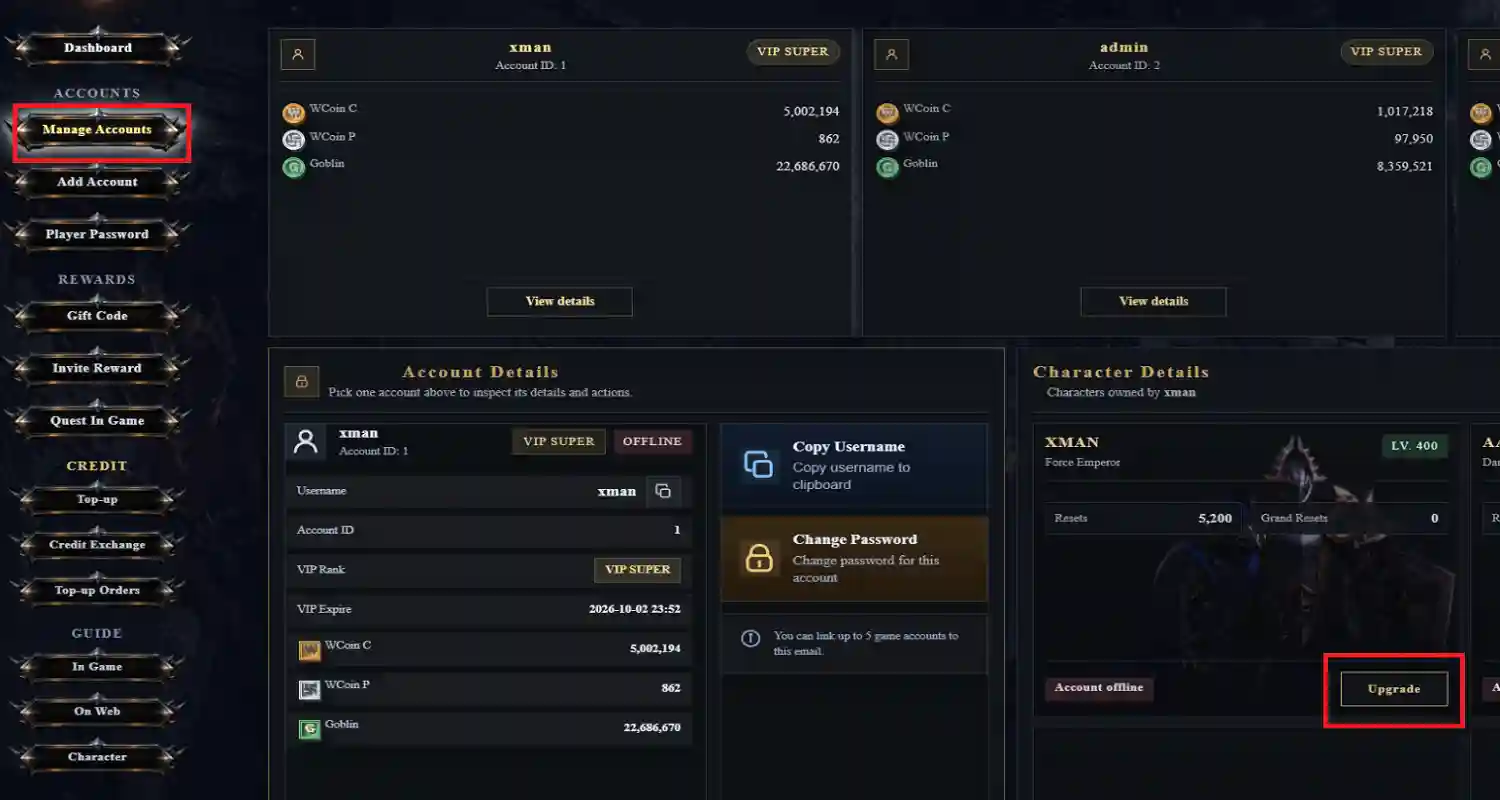
Exchange account WCoinP for character Reset progress and unlock the next Reset Buff milestone.
What is exchanged?
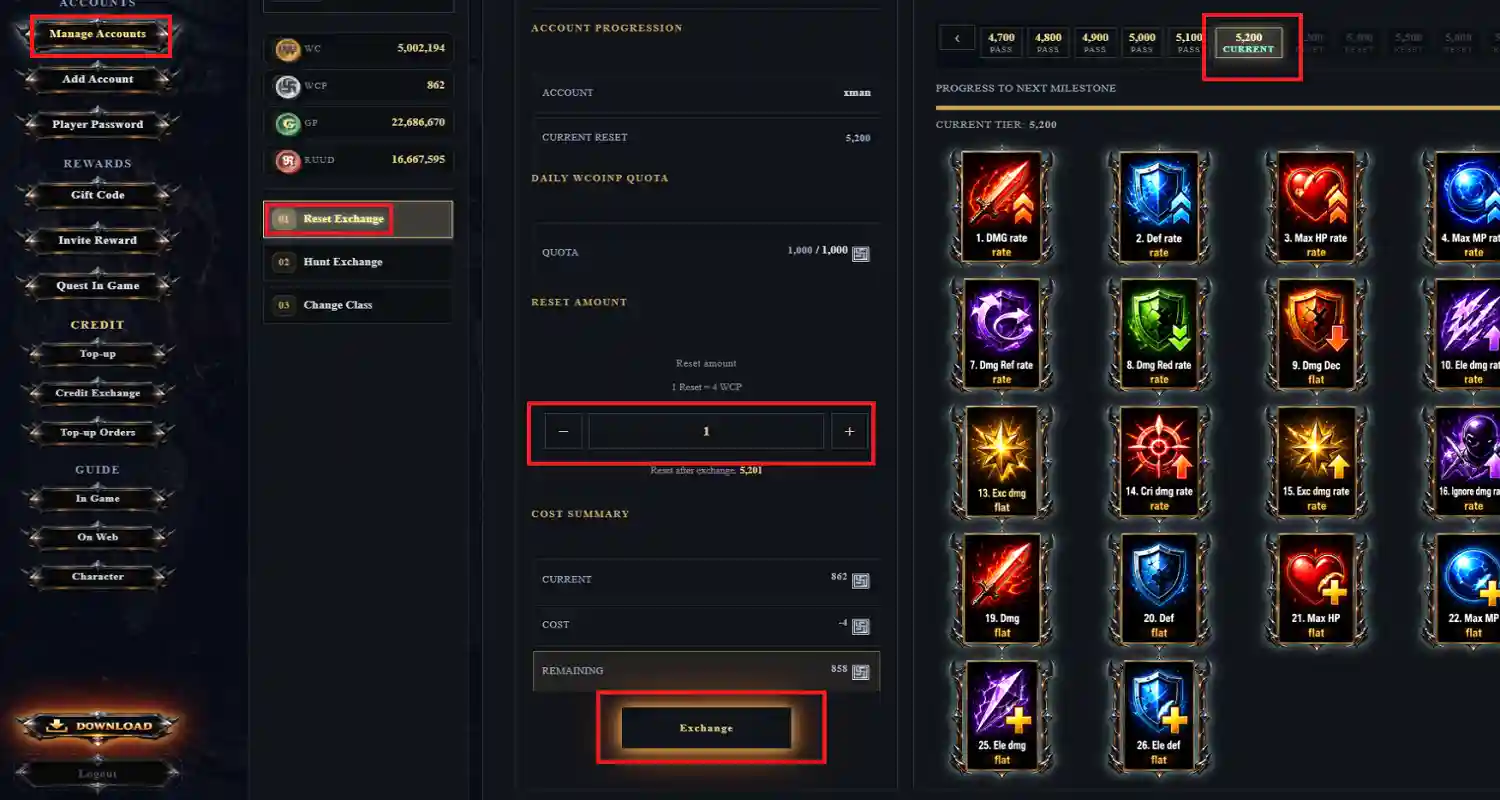
WCoinP is exchanged for one or more Reset counts on the selected character. The page calculates Reset count × VIP reset rate and shows the exact WCoinP cost before confirmation.
Step 1 — Select target
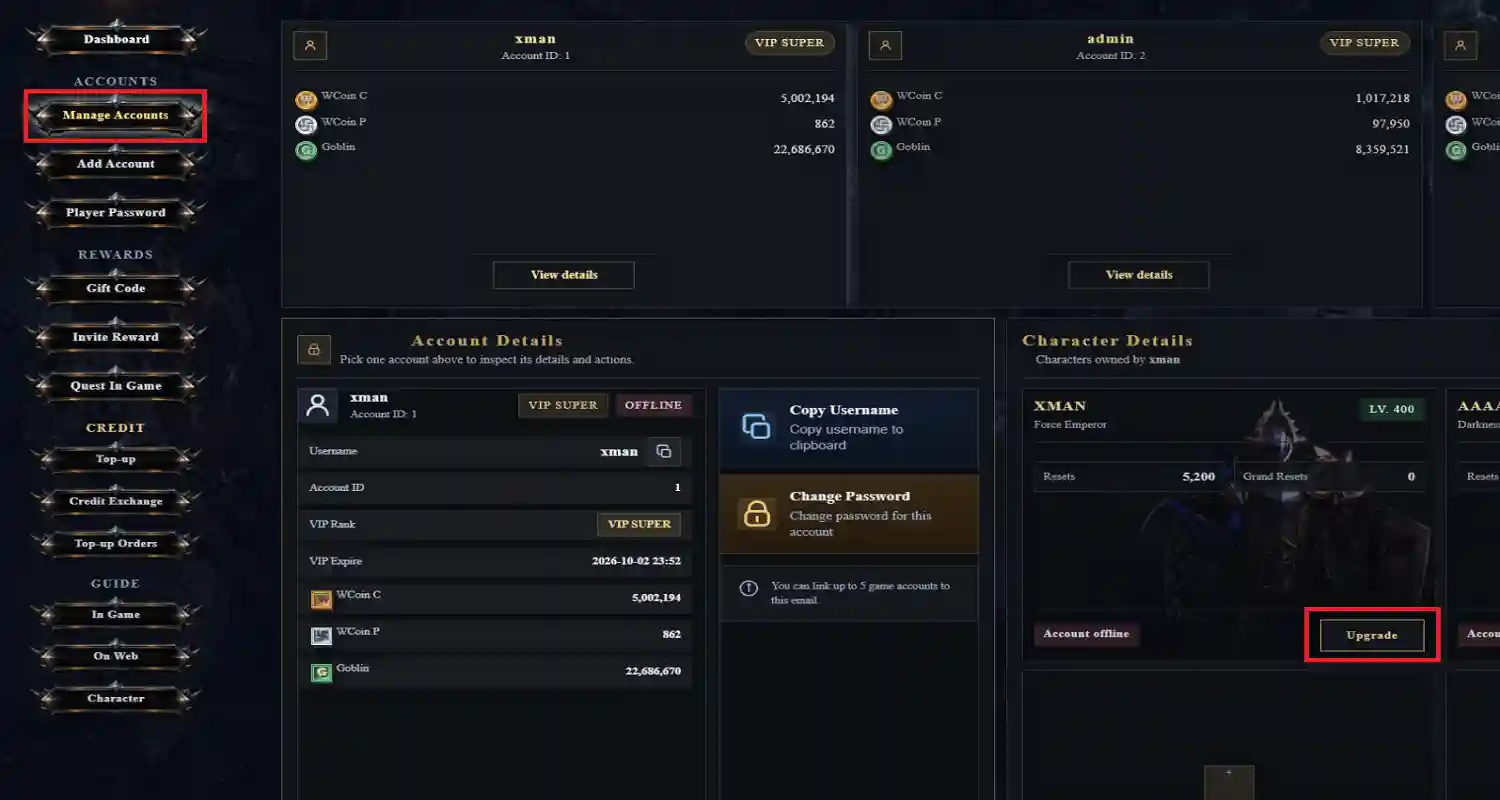
Choose a linked game account, then select a character. Review current Reset, Master Reset, class, level, WCoinP balance, and online/offline status.
Step 2 — Preview amount
Enter the number of Resets to purchase. The form caps the amount by the configured RESET_MAX, your WCoinP balance, and the remaining daily quota.
Step 3 — Check eligibility
The account must be offline. The server also checks the current character state, VIP rate, maximum Reset, daily quota, sufficient WCoinP, and request freshness.
Reset Buff milestones
Reset Buff definitions are loaded from the server configuration. Milestones can grant offensive, defensive, resource, or special bonuses; the current tier, active options, next milestone, and progress are displayed.
Apply and verify
Confirm the summary once. The request is protected against duplicate submission; on success the character Reset and WCoinP values refresh immediately. Failed validation does not consume currency.
Huntpoint Buff Exchange
Convert WCoinP into Hunt Points for individual character buffs.
Available buff families
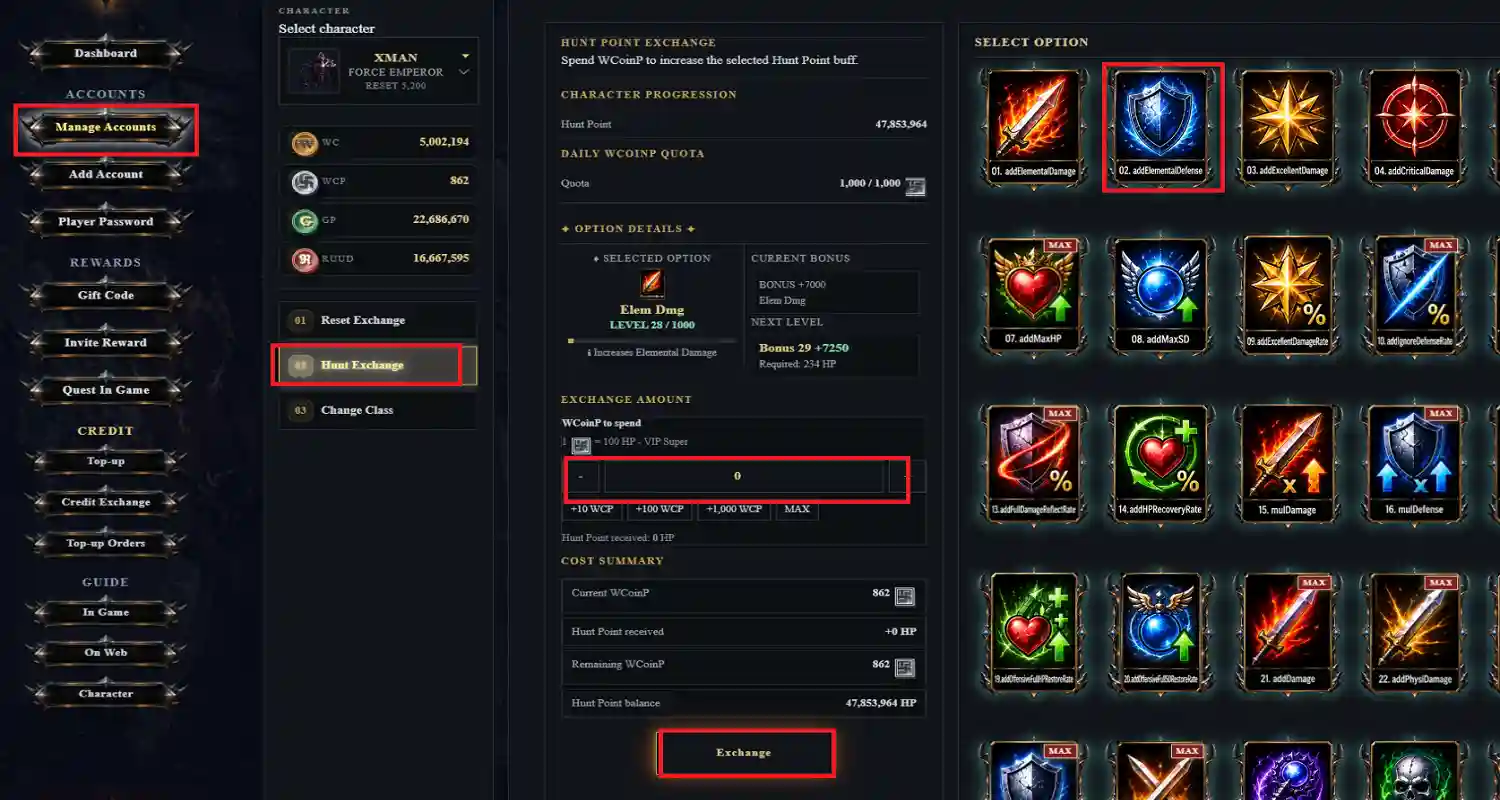
Choose from Elemental Damage/Defense; Excellent, Critical, Skill, Physical, Magic, and Curse Damage; Damage Decrease/Reflect; Defense; Max HP/SD; and their multiplier or recovery-rate variants.
Flat and percentage buffs
Flat options increase a numeric stat (damage, defense, HP, or SD). Percentage options include Excellent, Ignore Defense, Triple/Double Damage, Reflect, HP Recovery, and physical/magic/curse or HP/SD multipliers.
Level and bonus formula
Each buff has a shared maximum level of 1,000. Required points follow the configured cumulative curve; the displayed bonus scales from the option's maximum value and percentage flags.
Step-by-step purchase
Select the account and character, choose a buff, enter WCoinP to exchange, and review current points, level, next-level cost, projected points, and projected bonus before submitting.
VIP rate and daily quota
The WCoinP-to-Hunt Point rate is read from the account VIP tier. The page shows today's used and remaining quota; purchases stop when the quota or available WCoinP is exhausted.
Validation and result
The character must be offline, the target must remain below its maximum, and the server rechecks all values at submission. A successful exchange refreshes points, level, bonus, balance, and quota.
Contact Support
Contact the official 1stMU support team through one of the channels below whenever you need help with your account, character, payment, or gameplay.
What to include in your message
Provide your Player email, game account and character name, a clear description of the issue, the approximate time it happened, and screenshots or transaction references when relevant. Never send your password or verification code.
Player Community
Follow the official 1stMU social channels to find other players, receive announcements, share builds, and stay up to date with events.
Vote for 1stMU
Support the server by voting on the official server-listing sites.
Why vote?
Votes improve 1stMU visibility and help new players discover the server. Every vote contributes to the growth of the community.
How to vote
Open an official listing from the links published by the server team, complete the listing site's verification, and submit your vote.
Vote safely
Use only links shared through the official website or Discord. Never enter your GameCenter password on a third-party listing site.
After voting
Return to the website or Discord for the latest vote rewards, event announcements, and any claim instructions.